Ricoh IM 430Fb Desktop Multifunction Printer
The Ricoh IM 430Fb Multifunction Printer is a smart choice for a forward-thinking business. Easily connect mobile devices using mobile applications to print, scan, and access documents seamlessly. Unlock the full extent of the device capabilities with the user-friendly Smart Operation Panel. Plus, rely on high-level security and certifications, built-in to ensure your data is protected. With this Black-and-white intelligent device, you'll get access to the latest technology as it’s available, so your device capabilities scale up as your business does.
Compact and Convenient Design
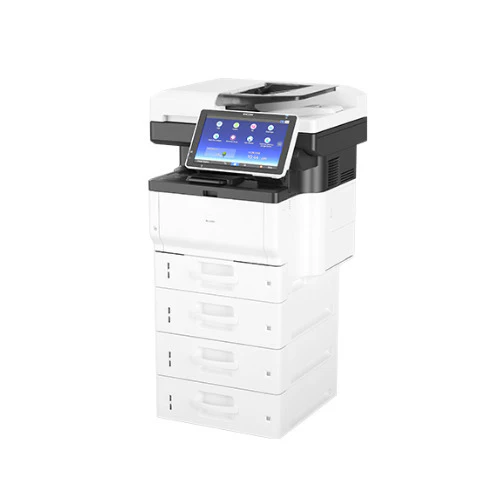
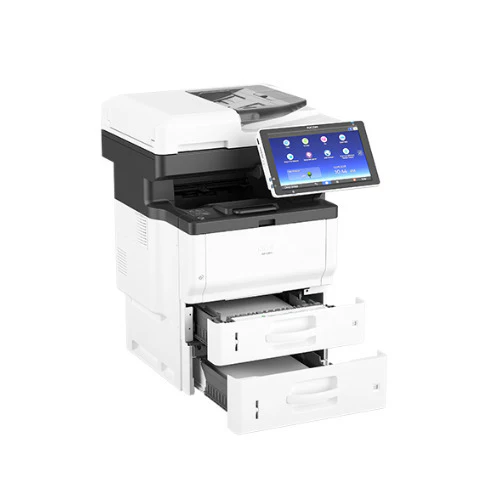
Make a big impact with the space-saving and budget-friendly Ricoh IM 430Fb Desktop Multifunction Printer (MFP). It offers print output at up to 45 pages per minute (ppm). You can digitize originals and share them instantly with advanced scanning and faxing capabilities. This printer gives you an option to add multiple paper trays to expand capacity to 2,100 sheets.
Smart Operation Panel
This IM 430Fb printer is equipped with the 10.1-inch Smart Operation Panel that helps to move between tasks with fingertip precision. It allows you to choose how information is displayed on the touchscreen control panel and add downloadable widgets and other icons for one-touch access to important information. Use RICOH Smart Integration Workflows for automated document process workflows, such as scanning directly to supported cloud accounts with OCR.
Simplicity with the Cloud
Use cloud connectivity to improve collaboration. Capture images, information and more from preferred cloud-based services using the embedded web browser and print or share them with one tap. Opt for apps from the RICOH Application Site for specialized tasks. You can use RICOH Content Manager for secured storage of important files and add other software solutions from third-party providers at any time.
Keep Documents and Data Moving
Download the RICOH Smart Device Connector app to grab and print information directly from your smartphone or tablet without utilities or drivers. You can easily scan documents to your personal mobile device with the app or save scans to a USB Flash Drive and take your work with you. You can even use the app to connect directly to Ricoh whiteboards and projectors for larger group presentations.
Maintain Optimal Uptime
Designed specifically to minimize downtime, the IM 430Fb includes How-To-Videos, FAQs and on-screen prompts pre-installed on the MFP to guide users through maintenance tutorials, troubleshooting and other helpful aids. Other available features include device administration software, service, and consumables alerts and real-time monitoring for optimal performance.
Share Information Digitally
Transform how you reach audiences with advanced scanning and faxing capabilities. Use the Single Pass Document Feeder to scan up to 40 images per minute (ipm). You can add the Optical Character Recognition (OCR) option to simplify storage and retrieval of scanned files via keyword search. With paperless faxing, you can send contracts, invoices and other forms quickly and economically.
Advanced Security
Restrict the release of prints only to authorized users with Locked Print and minimize security threats with a Hard Disk Drive that encrypts transmitted data. When you add the optional Near Field Communications (NFC) Card Reader, users are required to have a proximity or ID card to access MFP controls. Add optional RICOH Streamline NX software to issue chargebacks to specific users and departments.
Sharp Text and Clear Images
Impress audiences with sharp text and clear images with up to 1200 x 1200 dpi resolution. Use the 100-Sheet Bypass Tray for specialty media including thicker stocks, envelopes, labels and more. The Bypass Size Assist to prevent misfeeds by helping you correctly place custom-sized paper in the tray.
More Images

Ricoh IM 430Fb Desktop Multifunction Printer
The Ricoh IM 430Fb Multifunction Printer is a smart choice for a forward-thinking business. Easily connect mobile devices using mobile applications to print, scan, and access documents seamlessly. Unlock the full extent of the device capabilities with the user-friendly Smart Operation Panel. Plus, rely on high-level security and certifications, built-in to ensure your data is protected. With this Black-and-white intelligent device, you'll get access to the latest technology as it’s available, so your device capabilities scale up as your business does.
Compact and Convenient Design
Make a big impact with the space-saving and budget-friendly Ricoh IM 430Fb Desktop Multifunction Printer (MFP). It offers print output at up to 45 pages per minute (ppm). You can digitize originals and share them instantly with advanced scanning and faxing capabilities. This printer gives you an option to add multiple paper trays to expand capacity to 2,100 sheets.
Smart Operation Panel
This IM 430Fb printer is equipped with the 10.1-inch Smart Operation Panel that helps to move between tasks with fingertip precision. It allows you to choose how information is displayed on the touchscreen control panel and add downloadable widgets and other icons for one-touch access to important information. Use RICOH Smart Integration Workflows for automated document process workflows, such as scanning directly to supported cloud accounts with OCR.
Simplicity with the Cloud
Use cloud connectivity to improve collaboration. Capture images, information and more from preferred cloud-based services using the embedded web browser and print or share them with one tap. Opt for apps from the RICOH Application Site for specialized tasks. You can use RICOH Content Manager for secured storage of important files and add other software solutions from third-party providers at any time.
Keep Documents and Data Moving
Download the RICOH Smart Device Connector app to grab and print information directly from your smartphone or tablet without utilities or drivers. You can easily scan documents to your personal mobile device with the app or save scans to a USB Flash Drive and take your work with you. You can even use the app to connect directly to Ricoh whiteboards and projectors for larger group presentations.
Maintain Optimal Uptime
Designed specifically to minimize downtime, the IM 430Fb includes How-To-Videos, FAQs and on-screen prompts pre-installed on the MFP to guide users through maintenance tutorials, troubleshooting and other helpful aids. Other available features include device administration software, service, and consumables alerts and real-time monitoring for optimal performance.
Share Information Digitally
Transform how you reach audiences with advanced scanning and faxing capabilities. Use the Single Pass Document Feeder to scan up to 40 images per minute (ipm). You can add the Optical Character Recognition (OCR) option to simplify storage and retrieval of scanned files via keyword search. With paperless faxing, you can send contracts, invoices and other forms quickly and economically.
Advanced Security
Restrict the release of prints only to authorized users with Locked Print and minimize security threats with a Hard Disk Drive that encrypts transmitted data. When you add the optional Near Field Communications (NFC) Card Reader, users are required to have a proximity or ID card to access MFP controls. Add optional RICOH Streamline NX software to issue chargebacks to specific users and departments.
Sharp Text and Clear Images
Impress audiences with sharp text and clear images with up to 1200 x 1200 dpi resolution. Use the 100-Sheet Bypass Tray for specialty media including thicker stocks, envelopes, labels and more. The Bypass Size Assist to prevent misfeeds by helping you correctly place custom-sized paper in the tray.
Product Information
Product Information
Shipping & Returns
Shipping & Returns
Description
The Ricoh IM 430Fb Multifunction Printer is a smart choice for a forward-thinking business. Easily connect mobile devices using mobile applications to print, scan, and access documents seamlessly. Unlock the full extent of the device capabilities with the user-friendly Smart Operation Panel. Plus, rely on high-level security and certifications, built-in to ensure your data is protected. With this Black-and-white intelligent device, you'll get access to the latest technology as it’s available, so your device capabilities scale up as your business does.
Compact and Convenient Design
Make a big impact with the space-saving and budget-friendly Ricoh IM 430Fb Desktop Multifunction Printer (MFP). It offers print output at up to 45 pages per minute (ppm). You can digitize originals and share them instantly with advanced scanning and faxing capabilities. This printer gives you an option to add multiple paper trays to expand capacity to 2,100 sheets.
Smart Operation Panel
This IM 430Fb printer is equipped with the 10.1-inch Smart Operation Panel that helps to move between tasks with fingertip precision. It allows you to choose how information is displayed on the touchscreen control panel and add downloadable widgets and other icons for one-touch access to important information. Use RICOH Smart Integration Workflows for automated document process workflows, such as scanning directly to supported cloud accounts with OCR.
Simplicity with the Cloud
Use cloud connectivity to improve collaboration. Capture images, information and more from preferred cloud-based services using the embedded web browser and print or share them with one tap. Opt for apps from the RICOH Application Site for specialized tasks. You can use RICOH Content Manager for secured storage of important files and add other software solutions from third-party providers at any time.
Keep Documents and Data Moving
Download the RICOH Smart Device Connector app to grab and print information directly from your smartphone or tablet without utilities or drivers. You can easily scan documents to your personal mobile device with the app or save scans to a USB Flash Drive and take your work with you. You can even use the app to connect directly to Ricoh whiteboards and projectors for larger group presentations.
Maintain Optimal Uptime
Designed specifically to minimize downtime, the IM 430Fb includes How-To-Videos, FAQs and on-screen prompts pre-installed on the MFP to guide users through maintenance tutorials, troubleshooting and other helpful aids. Other available features include device administration software, service, and consumables alerts and real-time monitoring for optimal performance.
Share Information Digitally
Transform how you reach audiences with advanced scanning and faxing capabilities. Use the Single Pass Document Feeder to scan up to 40 images per minute (ipm). You can add the Optical Character Recognition (OCR) option to simplify storage and retrieval of scanned files via keyword search. With paperless faxing, you can send contracts, invoices and other forms quickly and economically.
Advanced Security
Restrict the release of prints only to authorized users with Locked Print and minimize security threats with a Hard Disk Drive that encrypts transmitted data. When you add the optional Near Field Communications (NFC) Card Reader, users are required to have a proximity or ID card to access MFP controls. Add optional RICOH Streamline NX software to issue chargebacks to specific users and departments.
Sharp Text and Clear Images
Impress audiences with sharp text and clear images with up to 1200 x 1200 dpi resolution. Use the 100-Sheet Bypass Tray for specialty media including thicker stocks, envelopes, labels and more. The Bypass Size Assist to prevent misfeeds by helping you correctly place custom-sized paper in the tray.