✨ New Arrivals Just Dropped!Explore


HomeStore
PTZOptics 4th Generation IP or Serial Joystick Controller for PTZ Cameras with Automatic Triggers
PTZOptics 4th Generation IP or Serial Joystick Controller for PTZ Cameras with Automatic Triggers
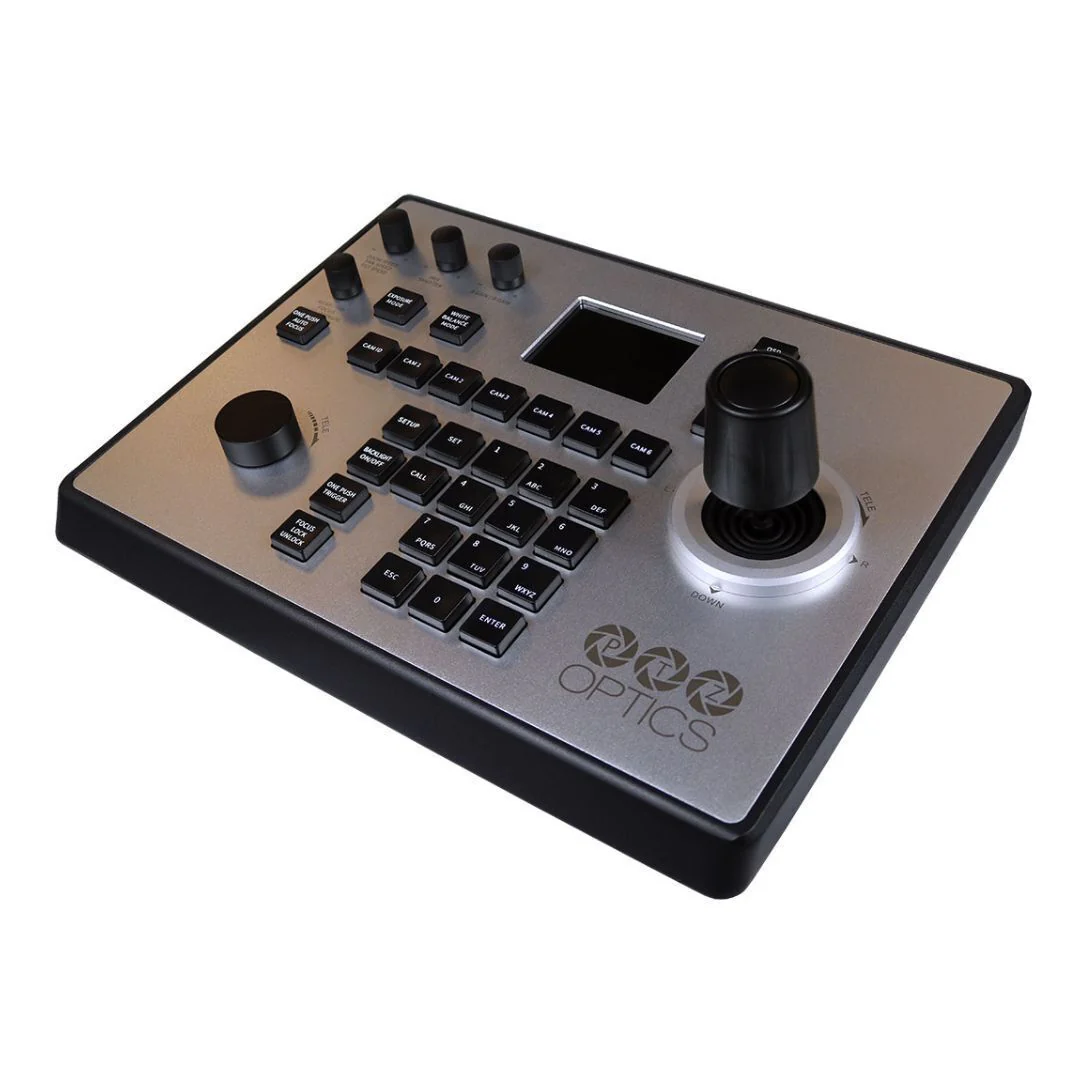
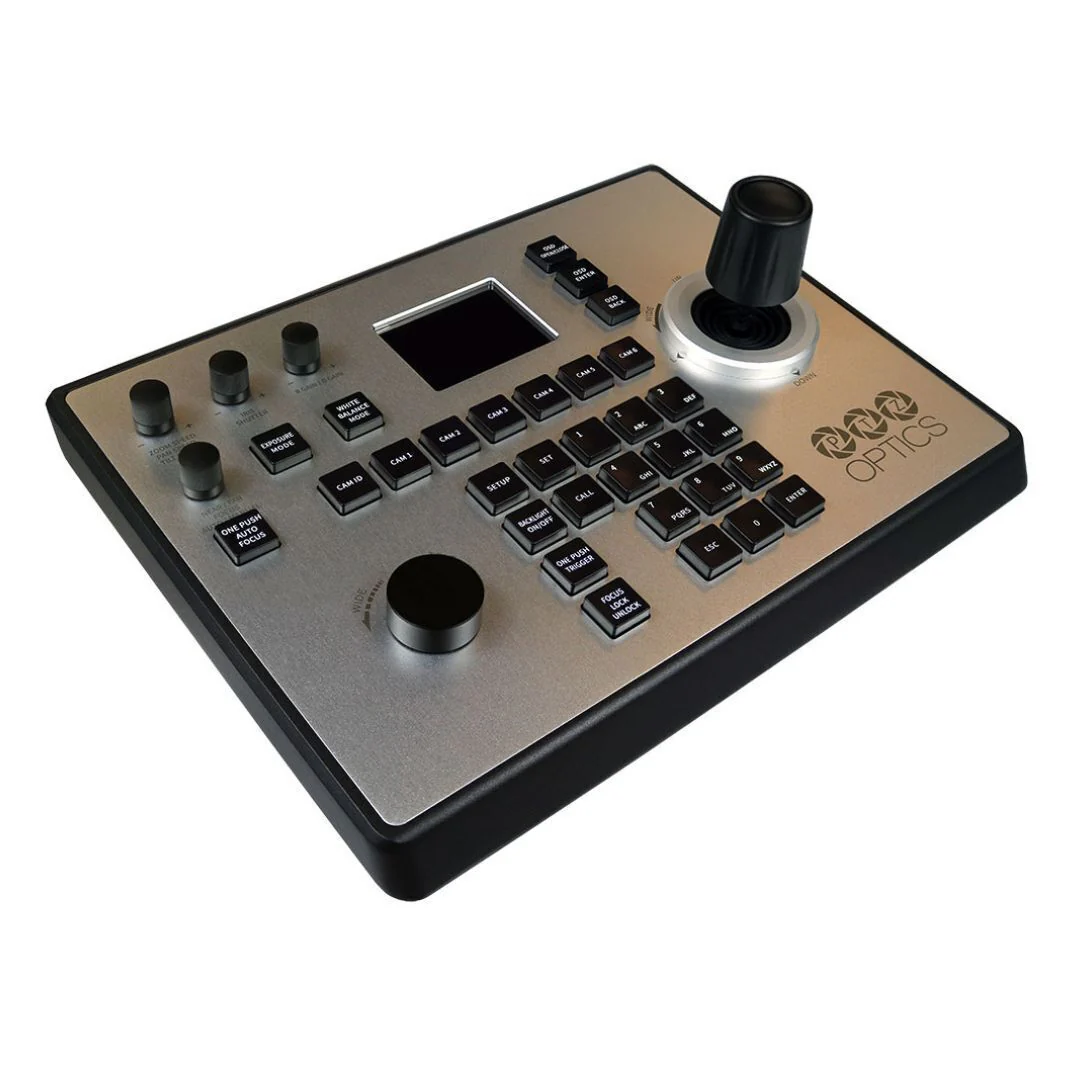
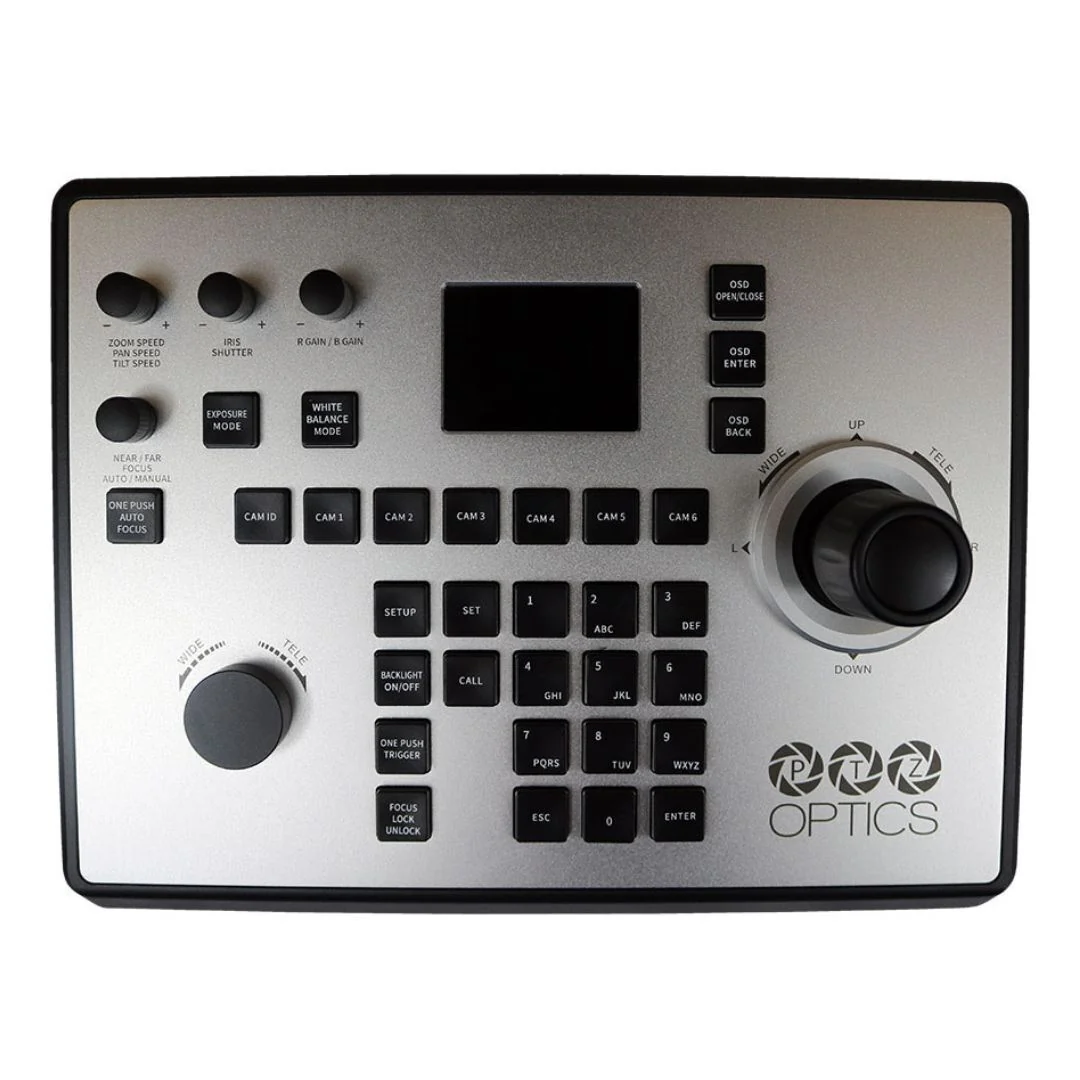
Introducing the PTZOptics 4th Generation IP or Serial Joystick Controller, compatible with most PTZ cameras operating serial or IP protocol, including Sony, the PT-JOY-G4 is a legacy-friendly controller designed to easily integrate into a wide array of existing production systems and even allows users to switch between protocols with the touch of a button.
Enhanced Setup Management
A newly added web user interface will decrease your setup time, allowing you to get multiple cameras up and running in as little as five minutes. If you’re using the PT-JOY-G4 for different productions or sets, PTZOptics got you covered. Import and export settings for specific use cases or production environments. For network setup, the PT-JOY-G4 will dynamically obtain an IP address upon connection to your LAN. If your network is not able to supply DHCP addresses, you can assign a static IP address to the controller.
Streamlined Production at Your Fingertips
With an expanded LCD screen and a wide range of knobs for fine-tuning, a single camera operator can easily operate cameras in basic, matrix, and normal modes. Access cameras and quickly recall preset locations and control white balance, red and blue gain, shutter speed, and more.
New Custom Button
Take a new level of control over your production with a customizable joystick button. This button is conveniently located at the top of the joystick controller for quick access to your most used functions. This joystick button is fully customizable so you can choose if you want it to start recording in your video production software or start auto-tracking on your currently selected camera.
Automatic Triggers
PTZOptics IP joystick controllers now support automatic triggers which can be used to trigger a command when switching a camera. Automatic Triggers are ideal for integrating your PT-JOY-G4 joystick controllers with your video switcher or other production equipment. Use Automatic Triggers to automate your video production workflow to effortlessly queue up your next camera or prepare your next scene.
Single Cable Simplicity
The PT-JOY-G4 includes Power over Ethernet (PoE). Take control of cameras all across your network with a single Ethernet cable connection. Simplify your next joystick setup with a PoE network switch.
Joystick Compatibility
the PTZOptics 4th Generation IP or Serial Joystick is compatible with VISCA Serial connections including PTZ cameras with RS-232, RS-485, and RS-422 from brands such as Aver, AIDA, BirdDog, Bolin, ClearOne, DataVideo, JVC, Lumens, Marshall Electronics, RGBLink, PTZOptics, Sony. Sony VISCA over IP includes PTZ cameras from AIDA, AVer, BirdDog, Bolin, BZBGear, ClearOne, JVC, Lumens, and Sony. PTZOptics VISCA all PTZOptics cameras, HuddleCamHD. PELCO-P and PELCO-D icludes PTZ cameras from BirdDog, DataVideo, JVC, Lumens, RGBLink, and Marshall Electronics.
SuperPresets
The PT-JOY-G4 can now trigger SuperPresets to control up to eight cameras with a single click. Super-Preset buttons can trigger synchronized PTZ preset commands across the selected cameras and a custom HTTP trigger for automation with video production software.
New Dynamic Camera Variable
There is a new variable that can be used in the SuperJoy’s and the PT-JOY-G4’s Web UI to optimize the use of custom buttons. Using the new -CURRENT-CAM- stub instead of a hard-coded IP address allows you to send a custom command to the currently selected camera. This new option allows you to use custom button commands with a vastly larger amount of cameras.
Additional Feature Updates and Bug Fixes
Additional features and bug fixes are outlined in the firmware changelog for each joystick here. Other notable features include the ability to save Pan, Tilt, Zoom, and Focus speeds for each camera, along with the ability to display Exposure and White Balance on the LCD screen of the SuperJoy.
Enhanced Setup Management
A newly added web user interface will decrease your setup time, allowing you to get multiple cameras up and running in as little as five minutes. If you’re using the PT-JOY-G4 for different productions or sets, PTZOptics got you covered. Import and export settings for specific use cases or production environments. For network setup, the PT-JOY-G4 will dynamically obtain an IP address upon connection to your LAN. If your network is not able to supply DHCP addresses, you can assign a static IP address to the controller.
Streamlined Production at Your Fingertips
With an expanded LCD screen and a wide range of knobs for fine-tuning, a single camera operator can easily operate cameras in basic, matrix, and normal modes. Access cameras and quickly recall preset locations and control white balance, red and blue gain, shutter speed, and more.
New Custom Button
Take a new level of control over your production with a customizable joystick button. This button is conveniently located at the top of the joystick controller for quick access to your most used functions. This joystick button is fully customizable so you can choose if you want it to start recording in your video production software or start auto-tracking on your currently selected camera.
Automatic Triggers
PTZOptics IP joystick controllers now support automatic triggers which can be used to trigger a command when switching a camera. Automatic Triggers are ideal for integrating your PT-JOY-G4 joystick controllers with your video switcher or other production equipment. Use Automatic Triggers to automate your video production workflow to effortlessly queue up your next camera or prepare your next scene.
Single Cable Simplicity
The PT-JOY-G4 includes Power over Ethernet (PoE). Take control of cameras all across your network with a single Ethernet cable connection. Simplify your next joystick setup with a PoE network switch.
Joystick Compatibility
the PTZOptics 4th Generation IP or Serial Joystick is compatible with VISCA Serial connections including PTZ cameras with RS-232, RS-485, and RS-422 from brands such as Aver, AIDA, BirdDog, Bolin, ClearOne, DataVideo, JVC, Lumens, Marshall Electronics, RGBLink, PTZOptics, Sony. Sony VISCA over IP includes PTZ cameras from AIDA, AVer, BirdDog, Bolin, BZBGear, ClearOne, JVC, Lumens, and Sony. PTZOptics VISCA all PTZOptics cameras, HuddleCamHD. PELCO-P and PELCO-D icludes PTZ cameras from BirdDog, DataVideo, JVC, Lumens, RGBLink, and Marshall Electronics.
SuperPresets
The PT-JOY-G4 can now trigger SuperPresets to control up to eight cameras with a single click. Super-Preset buttons can trigger synchronized PTZ preset commands across the selected cameras and a custom HTTP trigger for automation with video production software.
New Dynamic Camera Variable
There is a new variable that can be used in the SuperJoy’s and the PT-JOY-G4’s Web UI to optimize the use of custom buttons. Using the new -CURRENT-CAM- stub instead of a hard-coded IP address allows you to send a custom command to the currently selected camera. This new option allows you to use custom button commands with a vastly larger amount of cameras.
Additional Feature Updates and Bug Fixes
Additional features and bug fixes are outlined in the firmware changelog for each joystick here. Other notable features include the ability to save Pan, Tilt, Zoom, and Focus speeds for each camera, along with the ability to display Exposure and White Balance on the LCD screen of the SuperJoy.
$999.00
PTZOptics 4th Generation IP or Serial Joystick Controller for PTZ Cameras with Automatic Triggers—
$999.00
More Images


PTZOptics 4th Generation IP or Serial Joystick Controller for PTZ Cameras with Automatic Triggers
Introducing the PTZOptics 4th Generation IP or Serial Joystick Controller, compatible with most PTZ cameras operating serial or IP protocol, including Sony, the PT-JOY-G4 is a legacy-friendly controller designed to easily integrate into a wide array of existing production systems and even allows users to switch between protocols with the touch of a button.
Enhanced Setup Management
A newly added web user interface will decrease your setup time, allowing you to get multiple cameras up and running in as little as five minutes. If you’re using the PT-JOY-G4 for different productions or sets, PTZOptics got you covered. Import and export settings for specific use cases or production environments. For network setup, the PT-JOY-G4 will dynamically obtain an IP address upon connection to your LAN. If your network is not able to supply DHCP addresses, you can assign a static IP address to the controller.
Streamlined Production at Your Fingertips
With an expanded LCD screen and a wide range of knobs for fine-tuning, a single camera operator can easily operate cameras in basic, matrix, and normal modes. Access cameras and quickly recall preset locations and control white balance, red and blue gain, shutter speed, and more.
New Custom Button
Take a new level of control over your production with a customizable joystick button. This button is conveniently located at the top of the joystick controller for quick access to your most used functions. This joystick button is fully customizable so you can choose if you want it to start recording in your video production software or start auto-tracking on your currently selected camera.
Automatic Triggers
PTZOptics IP joystick controllers now support automatic triggers which can be used to trigger a command when switching a camera. Automatic Triggers are ideal for integrating your PT-JOY-G4 joystick controllers with your video switcher or other production equipment. Use Automatic Triggers to automate your video production workflow to effortlessly queue up your next camera or prepare your next scene.
Single Cable Simplicity
The PT-JOY-G4 includes Power over Ethernet (PoE). Take control of cameras all across your network with a single Ethernet cable connection. Simplify your next joystick setup with a PoE network switch.
Joystick Compatibility
the PTZOptics 4th Generation IP or Serial Joystick is compatible with VISCA Serial connections including PTZ cameras with RS-232, RS-485, and RS-422 from brands such as Aver, AIDA, BirdDog, Bolin, ClearOne, DataVideo, JVC, Lumens, Marshall Electronics, RGBLink, PTZOptics, Sony. Sony VISCA over IP includes PTZ cameras from AIDA, AVer, BirdDog, Bolin, BZBGear, ClearOne, JVC, Lumens, and Sony. PTZOptics VISCA all PTZOptics cameras, HuddleCamHD. PELCO-P and PELCO-D icludes PTZ cameras from BirdDog, DataVideo, JVC, Lumens, RGBLink, and Marshall Electronics.
SuperPresets
The PT-JOY-G4 can now trigger SuperPresets to control up to eight cameras with a single click. Super-Preset buttons can trigger synchronized PTZ preset commands across the selected cameras and a custom HTTP trigger for automation with video production software.
New Dynamic Camera Variable
There is a new variable that can be used in the SuperJoy’s and the PT-JOY-G4’s Web UI to optimize the use of custom buttons. Using the new -CURRENT-CAM- stub instead of a hard-coded IP address allows you to send a custom command to the currently selected camera. This new option allows you to use custom button commands with a vastly larger amount of cameras.
Additional Feature Updates and Bug Fixes
Additional features and bug fixes are outlined in the firmware changelog for each joystick here. Other notable features include the ability to save Pan, Tilt, Zoom, and Focus speeds for each camera, along with the ability to display Exposure and White Balance on the LCD screen of the SuperJoy.
Enhanced Setup Management
A newly added web user interface will decrease your setup time, allowing you to get multiple cameras up and running in as little as five minutes. If you’re using the PT-JOY-G4 for different productions or sets, PTZOptics got you covered. Import and export settings for specific use cases or production environments. For network setup, the PT-JOY-G4 will dynamically obtain an IP address upon connection to your LAN. If your network is not able to supply DHCP addresses, you can assign a static IP address to the controller.
Streamlined Production at Your Fingertips
With an expanded LCD screen and a wide range of knobs for fine-tuning, a single camera operator can easily operate cameras in basic, matrix, and normal modes. Access cameras and quickly recall preset locations and control white balance, red and blue gain, shutter speed, and more.
New Custom Button
Take a new level of control over your production with a customizable joystick button. This button is conveniently located at the top of the joystick controller for quick access to your most used functions. This joystick button is fully customizable so you can choose if you want it to start recording in your video production software or start auto-tracking on your currently selected camera.
Automatic Triggers
PTZOptics IP joystick controllers now support automatic triggers which can be used to trigger a command when switching a camera. Automatic Triggers are ideal for integrating your PT-JOY-G4 joystick controllers with your video switcher or other production equipment. Use Automatic Triggers to automate your video production workflow to effortlessly queue up your next camera or prepare your next scene.
Single Cable Simplicity
The PT-JOY-G4 includes Power over Ethernet (PoE). Take control of cameras all across your network with a single Ethernet cable connection. Simplify your next joystick setup with a PoE network switch.
Joystick Compatibility
the PTZOptics 4th Generation IP or Serial Joystick is compatible with VISCA Serial connections including PTZ cameras with RS-232, RS-485, and RS-422 from brands such as Aver, AIDA, BirdDog, Bolin, ClearOne, DataVideo, JVC, Lumens, Marshall Electronics, RGBLink, PTZOptics, Sony. Sony VISCA over IP includes PTZ cameras from AIDA, AVer, BirdDog, Bolin, BZBGear, ClearOne, JVC, Lumens, and Sony. PTZOptics VISCA all PTZOptics cameras, HuddleCamHD. PELCO-P and PELCO-D icludes PTZ cameras from BirdDog, DataVideo, JVC, Lumens, RGBLink, and Marshall Electronics.
SuperPresets
The PT-JOY-G4 can now trigger SuperPresets to control up to eight cameras with a single click. Super-Preset buttons can trigger synchronized PTZ preset commands across the selected cameras and a custom HTTP trigger for automation with video production software.
New Dynamic Camera Variable
There is a new variable that can be used in the SuperJoy’s and the PT-JOY-G4’s Web UI to optimize the use of custom buttons. Using the new -CURRENT-CAM- stub instead of a hard-coded IP address allows you to send a custom command to the currently selected camera. This new option allows you to use custom button commands with a vastly larger amount of cameras.
Additional Feature Updates and Bug Fixes
Additional features and bug fixes are outlined in the firmware changelog for each joystick here. Other notable features include the ability to save Pan, Tilt, Zoom, and Focus speeds for each camera, along with the ability to display Exposure and White Balance on the LCD screen of the SuperJoy.
Product Information
Product Information
Shipping & Returns
Shipping & Returns
Description
Introducing the PTZOptics 4th Generation IP or Serial Joystick Controller, compatible with most PTZ cameras operating serial or IP protocol, including Sony, the PT-JOY-G4 is a legacy-friendly controller designed to easily integrate into a wide array of existing production systems and even allows users to switch between protocols with the touch of a button.
Enhanced Setup Management
A newly added web user interface will decrease your setup time, allowing you to get multiple cameras up and running in as little as five minutes. If you’re using the PT-JOY-G4 for different productions or sets, PTZOptics got you covered. Import and export settings for specific use cases or production environments. For network setup, the PT-JOY-G4 will dynamically obtain an IP address upon connection to your LAN. If your network is not able to supply DHCP addresses, you can assign a static IP address to the controller.
Streamlined Production at Your Fingertips
With an expanded LCD screen and a wide range of knobs for fine-tuning, a single camera operator can easily operate cameras in basic, matrix, and normal modes. Access cameras and quickly recall preset locations and control white balance, red and blue gain, shutter speed, and more.
New Custom Button
Take a new level of control over your production with a customizable joystick button. This button is conveniently located at the top of the joystick controller for quick access to your most used functions. This joystick button is fully customizable so you can choose if you want it to start recording in your video production software or start auto-tracking on your currently selected camera.
Automatic Triggers
PTZOptics IP joystick controllers now support automatic triggers which can be used to trigger a command when switching a camera. Automatic Triggers are ideal for integrating your PT-JOY-G4 joystick controllers with your video switcher or other production equipment. Use Automatic Triggers to automate your video production workflow to effortlessly queue up your next camera or prepare your next scene.
Single Cable Simplicity
The PT-JOY-G4 includes Power over Ethernet (PoE). Take control of cameras all across your network with a single Ethernet cable connection. Simplify your next joystick setup with a PoE network switch.
Joystick Compatibility
the PTZOptics 4th Generation IP or Serial Joystick is compatible with VISCA Serial connections including PTZ cameras with RS-232, RS-485, and RS-422 from brands such as Aver, AIDA, BirdDog, Bolin, ClearOne, DataVideo, JVC, Lumens, Marshall Electronics, RGBLink, PTZOptics, Sony. Sony VISCA over IP includes PTZ cameras from AIDA, AVer, BirdDog, Bolin, BZBGear, ClearOne, JVC, Lumens, and Sony. PTZOptics VISCA all PTZOptics cameras, HuddleCamHD. PELCO-P and PELCO-D icludes PTZ cameras from BirdDog, DataVideo, JVC, Lumens, RGBLink, and Marshall Electronics.
SuperPresets
The PT-JOY-G4 can now trigger SuperPresets to control up to eight cameras with a single click. Super-Preset buttons can trigger synchronized PTZ preset commands across the selected cameras and a custom HTTP trigger for automation with video production software.
New Dynamic Camera Variable
There is a new variable that can be used in the SuperJoy’s and the PT-JOY-G4’s Web UI to optimize the use of custom buttons. Using the new -CURRENT-CAM- stub instead of a hard-coded IP address allows you to send a custom command to the currently selected camera. This new option allows you to use custom button commands with a vastly larger amount of cameras.
Additional Feature Updates and Bug Fixes
Additional features and bug fixes are outlined in the firmware changelog for each joystick here. Other notable features include the ability to save Pan, Tilt, Zoom, and Focus speeds for each camera, along with the ability to display Exposure and White Balance on the LCD screen of the SuperJoy.
Enhanced Setup Management
A newly added web user interface will decrease your setup time, allowing you to get multiple cameras up and running in as little as five minutes. If you’re using the PT-JOY-G4 for different productions or sets, PTZOptics got you covered. Import and export settings for specific use cases or production environments. For network setup, the PT-JOY-G4 will dynamically obtain an IP address upon connection to your LAN. If your network is not able to supply DHCP addresses, you can assign a static IP address to the controller.
Streamlined Production at Your Fingertips
With an expanded LCD screen and a wide range of knobs for fine-tuning, a single camera operator can easily operate cameras in basic, matrix, and normal modes. Access cameras and quickly recall preset locations and control white balance, red and blue gain, shutter speed, and more.
New Custom Button
Take a new level of control over your production with a customizable joystick button. This button is conveniently located at the top of the joystick controller for quick access to your most used functions. This joystick button is fully customizable so you can choose if you want it to start recording in your video production software or start auto-tracking on your currently selected camera.
Automatic Triggers
PTZOptics IP joystick controllers now support automatic triggers which can be used to trigger a command when switching a camera. Automatic Triggers are ideal for integrating your PT-JOY-G4 joystick controllers with your video switcher or other production equipment. Use Automatic Triggers to automate your video production workflow to effortlessly queue up your next camera or prepare your next scene.
Single Cable Simplicity
The PT-JOY-G4 includes Power over Ethernet (PoE). Take control of cameras all across your network with a single Ethernet cable connection. Simplify your next joystick setup with a PoE network switch.
Joystick Compatibility
the PTZOptics 4th Generation IP or Serial Joystick is compatible with VISCA Serial connections including PTZ cameras with RS-232, RS-485, and RS-422 from brands such as Aver, AIDA, BirdDog, Bolin, ClearOne, DataVideo, JVC, Lumens, Marshall Electronics, RGBLink, PTZOptics, Sony. Sony VISCA over IP includes PTZ cameras from AIDA, AVer, BirdDog, Bolin, BZBGear, ClearOne, JVC, Lumens, and Sony. PTZOptics VISCA all PTZOptics cameras, HuddleCamHD. PELCO-P and PELCO-D icludes PTZ cameras from BirdDog, DataVideo, JVC, Lumens, RGBLink, and Marshall Electronics.
SuperPresets
The PT-JOY-G4 can now trigger SuperPresets to control up to eight cameras with a single click. Super-Preset buttons can trigger synchronized PTZ preset commands across the selected cameras and a custom HTTP trigger for automation with video production software.
New Dynamic Camera Variable
There is a new variable that can be used in the SuperJoy’s and the PT-JOY-G4’s Web UI to optimize the use of custom buttons. Using the new -CURRENT-CAM- stub instead of a hard-coded IP address allows you to send a custom command to the currently selected camera. This new option allows you to use custom button commands with a vastly larger amount of cameras.
Additional Feature Updates and Bug Fixes
Additional features and bug fixes are outlined in the firmware changelog for each joystick here. Other notable features include the ability to save Pan, Tilt, Zoom, and Focus speeds for each camera, along with the ability to display Exposure and White Balance on the LCD screen of the SuperJoy.