Dell 24-Inch Video Conferencing Monitor with Dual 5W Speakers and Razor Sharp Pop-Up IR Camera
Dell 24-Inch Video Conferencing Monitor with Dual 5W Speakers and Razor Sharp Pop-Up IR Camera
Collaborate like you’re there. The Dell 24-Inch Video Conferencing
Monitor has razor-sharp video clarity of the pop-up 5MP IR camera that gives
you more than twice the details and zoom of a 2MP on a wide, beautiful screen.
Dual 5W integrated speakers deliver clear, vibrant communication from any
workspace quashing background chatter with a noise-canceling microphone.
Enhanced Security
The pop-up web camera hides safely out of sight when not in use, and there’s an
intelligent layer of security with facial recognition through Windows Hello.
Seamless Video from All Angles
FHD video with 30 frames per second rate delivers seamless, media-quality video
and stunning screen clarity. The 178 to 178 degree wide viewing angle
presents superior views and consistent colors ideal for video conferencing.
Connect to Productivity
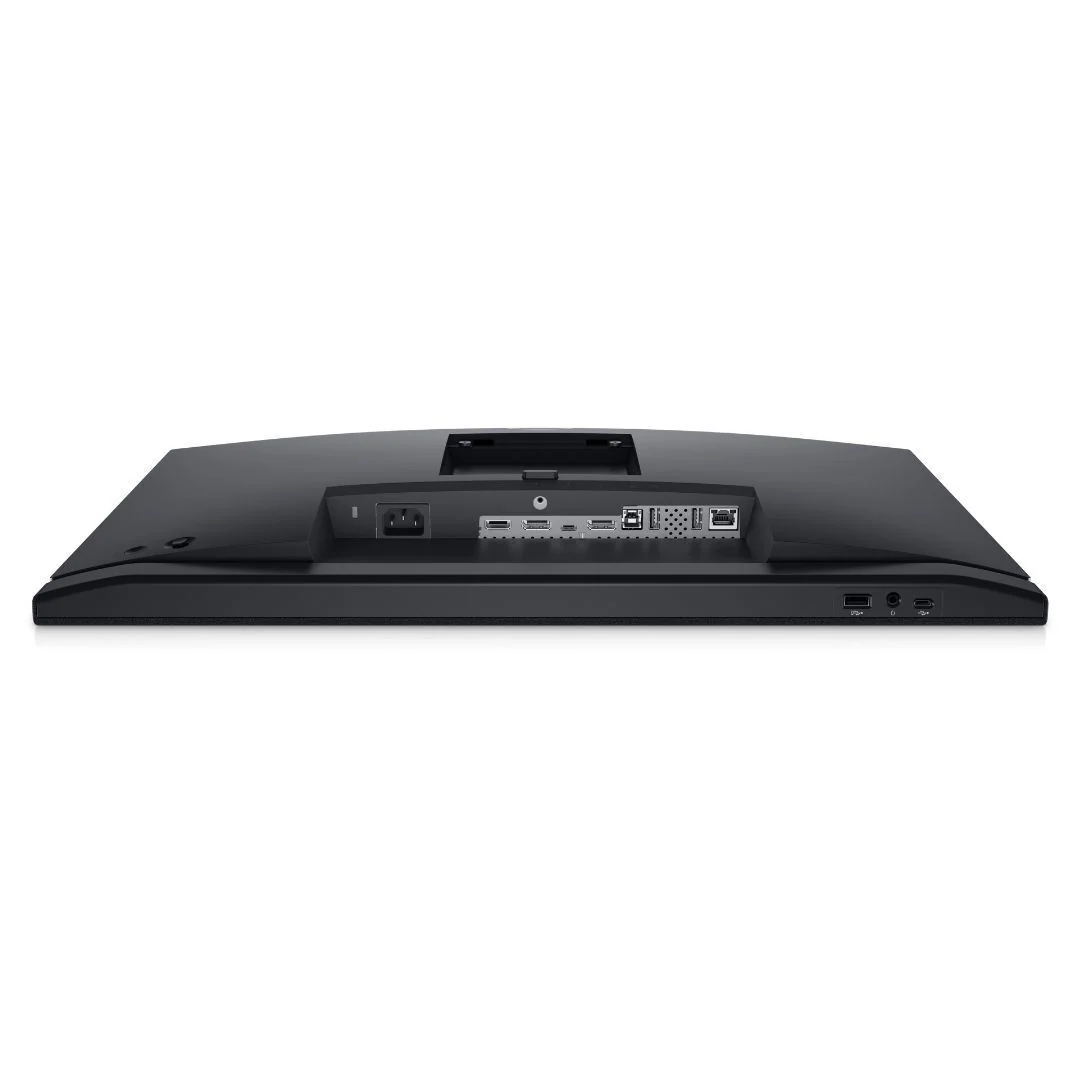
With wired connectivity options like RJ45 and USB-C, your monitor delivers
reliable Ethernet, power, audio, and video all in a clutter-free setup.
The Power of USB-C
Get up to 90W of power delivery via USB-C, and charge your laptop even when the
monitor is off with the Always On Power Delivery feature. This single-cable
solution also saves up to 72 percent of workspace setup time, reduces cable
clutter, and transmits power, data, and audio all at once.
Quick Convenience
Plug in whatever you need and keep it in reach with the two, super speed USB
5 Gbps USB 3.2 Gen1 quick-access ports. There’s even space to charge your mobile
phone up to 15W power charging with the USB-C quick-access port.
Enhanced Manageability
Managing your monitor is easy with MAC Address pass-through, PXE Boot, and
Wake-on-LAN conveniently built in.
Multitask Efficiently
Connect two PC sources to the monitor the intelligent Auto KVM feature detects
the second connected PC and seamlessly switches controls over. KVM keyboard,
video, and mouse allow you to control both PCs with a single keyboard and
mouse. Plus, you can enhance efficiency by 21 percent by adding a second
monitor via the daisy chain feature.
Crafted for Eye Wellness
ComfortView Plus is an always-on, built-in low-blue light screen that optimizes
eye comfort by reducing potentially harmful blue light emissions while delivering
excellent color accuracy.
Designed with You in Mind
Navigate the menu and adjust screen settings with the easy-to-use joystick
control.
Beauty Meets Function
This sleek monitor features a small base and an improved cable management
design that hides cables in the monitor riser, for a clutter-free desk space at
your office or home office.
Comfort is Key
Tilt, swivel, pivot and adjust the height of your monitor to a maximum of 140mm
because you should be comfortable however and wherever you work.
Productive at Every Level
Easy Arrange allows you to easily tile multiple applications across one or more
screens with 38 pre-set window partitions and the ability to personalize up to
five windows, giving you improved multitasking abilities.
Seamless Transitions
The auto-restore feature remembers where you left off, so applications will go
back to where you left them, even after you’ve unplugged.
More Images




Dell 24-Inch Video Conferencing Monitor with Dual 5W Speakers and Razor Sharp Pop-Up IR Camera
Collaborate like you’re there. The Dell 24-Inch Video Conferencing
Monitor has razor-sharp video clarity of the pop-up 5MP IR camera that gives
you more than twice the details and zoom of a 2MP on a wide, beautiful screen.
Dual 5W integrated speakers deliver clear, vibrant communication from any
workspace quashing background chatter with a noise-canceling microphone.
Enhanced Security
The pop-up web camera hides safely out of sight when not in use, and there’s an
intelligent layer of security with facial recognition through Windows Hello.
Seamless Video from All Angles
FHD video with 30 frames per second rate delivers seamless, media-quality video
and stunning screen clarity. The 178 to 178 degree wide viewing angle
presents superior views and consistent colors ideal for video conferencing.
Connect to Productivity
With wired connectivity options like RJ45 and USB-C, your monitor delivers
reliable Ethernet, power, audio, and video all in a clutter-free setup.
The Power of USB-C
Get up to 90W of power delivery via USB-C, and charge your laptop even when the
monitor is off with the Always On Power Delivery feature. This single-cable
solution also saves up to 72 percent of workspace setup time, reduces cable
clutter, and transmits power, data, and audio all at once.
Quick Convenience
Plug in whatever you need and keep it in reach with the two, super speed USB
5 Gbps USB 3.2 Gen1 quick-access ports. There’s even space to charge your mobile
phone up to 15W power charging with the USB-C quick-access port.
Enhanced Manageability
Managing your monitor is easy with MAC Address pass-through, PXE Boot, and
Wake-on-LAN conveniently built in.
Multitask Efficiently
Connect two PC sources to the monitor the intelligent Auto KVM feature detects
the second connected PC and seamlessly switches controls over. KVM keyboard,
video, and mouse allow you to control both PCs with a single keyboard and
mouse. Plus, you can enhance efficiency by 21 percent by adding a second
monitor via the daisy chain feature.
Crafted for Eye Wellness
ComfortView Plus is an always-on, built-in low-blue light screen that optimizes
eye comfort by reducing potentially harmful blue light emissions while delivering
excellent color accuracy.
Designed with You in Mind
Navigate the menu and adjust screen settings with the easy-to-use joystick
control.
Beauty Meets Function
This sleek monitor features a small base and an improved cable management
design that hides cables in the monitor riser, for a clutter-free desk space at
your office or home office.
Comfort is Key
Tilt, swivel, pivot and adjust the height of your monitor to a maximum of 140mm
because you should be comfortable however and wherever you work.
Productive at Every Level
Easy Arrange allows you to easily tile multiple applications across one or more
screens with 38 pre-set window partitions and the ability to personalize up to
five windows, giving you improved multitasking abilities.
Seamless Transitions
The auto-restore feature remembers where you left off, so applications will go
back to where you left them, even after you’ve unplugged.
Product Information
Product Information
Shipping & Returns
Shipping & Returns
Description
Collaborate like you’re there. The Dell 24-Inch Video Conferencing
Monitor has razor-sharp video clarity of the pop-up 5MP IR camera that gives
you more than twice the details and zoom of a 2MP on a wide, beautiful screen.
Dual 5W integrated speakers deliver clear, vibrant communication from any
workspace quashing background chatter with a noise-canceling microphone.
Enhanced Security
The pop-up web camera hides safely out of sight when not in use, and there’s an
intelligent layer of security with facial recognition through Windows Hello.
Seamless Video from All Angles
FHD video with 30 frames per second rate delivers seamless, media-quality video
and stunning screen clarity. The 178 to 178 degree wide viewing angle
presents superior views and consistent colors ideal for video conferencing.
Connect to Productivity
With wired connectivity options like RJ45 and USB-C, your monitor delivers
reliable Ethernet, power, audio, and video all in a clutter-free setup.
The Power of USB-C
Get up to 90W of power delivery via USB-C, and charge your laptop even when the
monitor is off with the Always On Power Delivery feature. This single-cable
solution also saves up to 72 percent of workspace setup time, reduces cable
clutter, and transmits power, data, and audio all at once.
Quick Convenience
Plug in whatever you need and keep it in reach with the two, super speed USB
5 Gbps USB 3.2 Gen1 quick-access ports. There’s even space to charge your mobile
phone up to 15W power charging with the USB-C quick-access port.
Enhanced Manageability
Managing your monitor is easy with MAC Address pass-through, PXE Boot, and
Wake-on-LAN conveniently built in.
Multitask Efficiently
Connect two PC sources to the monitor the intelligent Auto KVM feature detects
the second connected PC and seamlessly switches controls over. KVM keyboard,
video, and mouse allow you to control both PCs with a single keyboard and
mouse. Plus, you can enhance efficiency by 21 percent by adding a second
monitor via the daisy chain feature.
Crafted for Eye Wellness
ComfortView Plus is an always-on, built-in low-blue light screen that optimizes
eye comfort by reducing potentially harmful blue light emissions while delivering
excellent color accuracy.
Designed with You in Mind
Navigate the menu and adjust screen settings with the easy-to-use joystick
control.
Beauty Meets Function
This sleek monitor features a small base and an improved cable management
design that hides cables in the monitor riser, for a clutter-free desk space at
your office or home office.
Comfort is Key
Tilt, swivel, pivot and adjust the height of your monitor to a maximum of 140mm
because you should be comfortable however and wherever you work.
Productive at Every Level
Easy Arrange allows you to easily tile multiple applications across one or more
screens with 38 pre-set window partitions and the ability to personalize up to
five windows, giving you improved multitasking abilities.
Seamless Transitions
The auto-restore feature remembers where you left off, so applications will go
back to where you left them, even after you’ve unplugged.