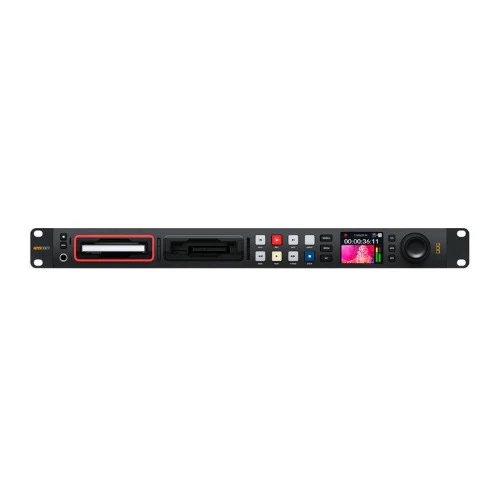
Blackmagic Design HyperDeck Studio 4K Pro
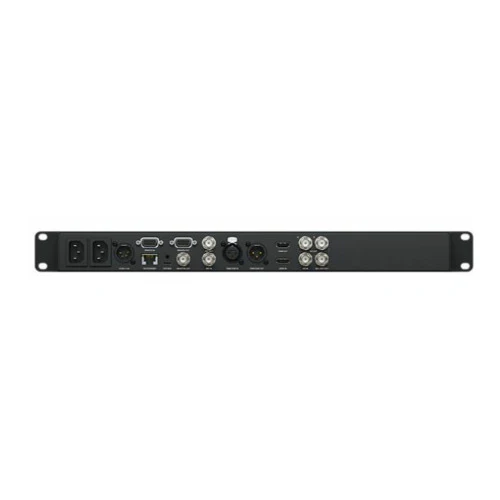
For extreme power, the HyperDeck Studio 4K Pro has all the features of the HD models, combined with incredible processing for working in Ultra HD. This model’s SDI has been upgraded to full 12G-SDI with a loop 12G-SDI output. The two SDI outputs are both 12G-SDI so you can play ProRes 4444 files for true Ultra HD fill and key out. The HDMI connections and the ProRes and DNx file formats all switch between SD, HD, and Ultra HD television standards. Like the other models, H.264 is included for SD and HD, but then switches to H.265 when recording in Ultra HD. Even the networking has been upgraded to 10G Ethernet for incredible speed! You also get 2 redundant AC power supplies!
Mastering Recorder
This model can record to H.264, ProRes, and DNx files, so are perfect for recording broadcast masters! You can even use PCM or AAC audio, plus the 4K model adds H.265 when recording to Ultra HD files. You get everything you need to send shows to broadcasters and for uploading to YouTube.
ISO Recording
This model features timecode and reference generators, with outputs to loop to other HyperDecks. This means you can build a rack of HyperDeck Studios for ISO camera recording, allowing multi-cam editing after live events!
Digital Signage
HyperDeck Studio is perfect for digital signage as it has an HDMI output for connecting to large screen TVs and projectors. The built-in sync generator lets you combine multiple HyperDecks for large multiscreen video walls. There's even FTP for file upload and a protocol for remote control!
Broadcast Archive
HyperDeck Studio supports all SD and HD standards so it’s ideal for archiving old television shows from broadcast decks such as Digital Betacam, Betacam SP, U-matic, and VHS. You can even record directly to H.264 to maximize storage. For analog decks, just add a Mini Converter Analog to SDI!
Bright Color LCD Status Display
HyperDeck Studio features traditional deck-style transport controls, including a search dial for jog, shuttle, and scroll. The compact LCD shows timecode and transport information, plus a full-color thumbnail preview of the current clip in record or playback.
Traditional Broadcast Deck Controls
HyperDeck Studio includes a traditional broadcast-style control panel that's very fast to use. Simply press the record button and you instantly start recording the video input to a file! This Pro model has a machined metal search dial that supports shuttle, jog and scroll so you can find clips fast. Any button pressed on the front panel is sent to the rear RS-422 remote output for looping control to multiple HyperDecks. It also includes a front panel speaker and headphone socket for live audio monitoring.
Dual Media Slots
The HyperDeck Studio features dual media slots for non-stop recording. When the recording card becomes full, the recording automatically continues onto the next card. That’s perfect when recording long live events because you can hot-swap a full card for an empty card while recording continues in the other slot! Each slot has a status indicator to show which card is being used, either red for record or green for playback.
Popular ProRes, DNx, H.264 and H.265 Files
The 4K model adds H.265 when recording in Ultra HD. That means you get tight 60:1 to 285:1 compression ratios for very small files at full broadcast quality. Plus you can choose uncompressed PCM audio, or even AAC audio when uploading files to YouTube. It also supports both ExFAT and HFS+ disk formats and long-duration single file recordings.
Incredibly Fast Network File Transfers
The HyperDeck allows media files to be uploaded remotely, using simple FTP client software. With 10G Ethernet built into the HyperDeck Studio 4K Pro model, file transfers are so fast, they are faster than the SD card or SSD media disks!
Original: $1,755.00
-65%$1,755.00
$614.25More Images

Blackmagic Design HyperDeck Studio 4K Pro
For extreme power, the HyperDeck Studio 4K Pro has all the features of the HD models, combined with incredible processing for working in Ultra HD. This model’s SDI has been upgraded to full 12G-SDI with a loop 12G-SDI output. The two SDI outputs are both 12G-SDI so you can play ProRes 4444 files for true Ultra HD fill and key out. The HDMI connections and the ProRes and DNx file formats all switch between SD, HD, and Ultra HD television standards. Like the other models, H.264 is included for SD and HD, but then switches to H.265 when recording in Ultra HD. Even the networking has been upgraded to 10G Ethernet for incredible speed! You also get 2 redundant AC power supplies!
Mastering Recorder
This model can record to H.264, ProRes, and DNx files, so are perfect for recording broadcast masters! You can even use PCM or AAC audio, plus the 4K model adds H.265 when recording to Ultra HD files. You get everything you need to send shows to broadcasters and for uploading to YouTube.
ISO Recording
This model features timecode and reference generators, with outputs to loop to other HyperDecks. This means you can build a rack of HyperDeck Studios for ISO camera recording, allowing multi-cam editing after live events!
Digital Signage
HyperDeck Studio is perfect for digital signage as it has an HDMI output for connecting to large screen TVs and projectors. The built-in sync generator lets you combine multiple HyperDecks for large multiscreen video walls. There's even FTP for file upload and a protocol for remote control!
Broadcast Archive
HyperDeck Studio supports all SD and HD standards so it’s ideal for archiving old television shows from broadcast decks such as Digital Betacam, Betacam SP, U-matic, and VHS. You can even record directly to H.264 to maximize storage. For analog decks, just add a Mini Converter Analog to SDI!
Bright Color LCD Status Display
HyperDeck Studio features traditional deck-style transport controls, including a search dial for jog, shuttle, and scroll. The compact LCD shows timecode and transport information, plus a full-color thumbnail preview of the current clip in record or playback.
Traditional Broadcast Deck Controls
HyperDeck Studio includes a traditional broadcast-style control panel that's very fast to use. Simply press the record button and you instantly start recording the video input to a file! This Pro model has a machined metal search dial that supports shuttle, jog and scroll so you can find clips fast. Any button pressed on the front panel is sent to the rear RS-422 remote output for looping control to multiple HyperDecks. It also includes a front panel speaker and headphone socket for live audio monitoring.
Dual Media Slots
The HyperDeck Studio features dual media slots for non-stop recording. When the recording card becomes full, the recording automatically continues onto the next card. That’s perfect when recording long live events because you can hot-swap a full card for an empty card while recording continues in the other slot! Each slot has a status indicator to show which card is being used, either red for record or green for playback.
Popular ProRes, DNx, H.264 and H.265 Files
The 4K model adds H.265 when recording in Ultra HD. That means you get tight 60:1 to 285:1 compression ratios for very small files at full broadcast quality. Plus you can choose uncompressed PCM audio, or even AAC audio when uploading files to YouTube. It also supports both ExFAT and HFS+ disk formats and long-duration single file recordings.
Incredibly Fast Network File Transfers
The HyperDeck allows media files to be uploaded remotely, using simple FTP client software. With 10G Ethernet built into the HyperDeck Studio 4K Pro model, file transfers are so fast, they are faster than the SD card or SSD media disks!
Product Information
Product Information
Shipping & Returns
Shipping & Returns
Description
For extreme power, the HyperDeck Studio 4K Pro has all the features of the HD models, combined with incredible processing for working in Ultra HD. This model’s SDI has been upgraded to full 12G-SDI with a loop 12G-SDI output. The two SDI outputs are both 12G-SDI so you can play ProRes 4444 files for true Ultra HD fill and key out. The HDMI connections and the ProRes and DNx file formats all switch between SD, HD, and Ultra HD television standards. Like the other models, H.264 is included for SD and HD, but then switches to H.265 when recording in Ultra HD. Even the networking has been upgraded to 10G Ethernet for incredible speed! You also get 2 redundant AC power supplies!
Mastering Recorder
This model can record to H.264, ProRes, and DNx files, so are perfect for recording broadcast masters! You can even use PCM or AAC audio, plus the 4K model adds H.265 when recording to Ultra HD files. You get everything you need to send shows to broadcasters and for uploading to YouTube.
ISO Recording
This model features timecode and reference generators, with outputs to loop to other HyperDecks. This means you can build a rack of HyperDeck Studios for ISO camera recording, allowing multi-cam editing after live events!
Digital Signage
HyperDeck Studio is perfect for digital signage as it has an HDMI output for connecting to large screen TVs and projectors. The built-in sync generator lets you combine multiple HyperDecks for large multiscreen video walls. There's even FTP for file upload and a protocol for remote control!
Broadcast Archive
HyperDeck Studio supports all SD and HD standards so it’s ideal for archiving old television shows from broadcast decks such as Digital Betacam, Betacam SP, U-matic, and VHS. You can even record directly to H.264 to maximize storage. For analog decks, just add a Mini Converter Analog to SDI!
Bright Color LCD Status Display
HyperDeck Studio features traditional deck-style transport controls, including a search dial for jog, shuttle, and scroll. The compact LCD shows timecode and transport information, plus a full-color thumbnail preview of the current clip in record or playback.
Traditional Broadcast Deck Controls
HyperDeck Studio includes a traditional broadcast-style control panel that's very fast to use. Simply press the record button and you instantly start recording the video input to a file! This Pro model has a machined metal search dial that supports shuttle, jog and scroll so you can find clips fast. Any button pressed on the front panel is sent to the rear RS-422 remote output for looping control to multiple HyperDecks. It also includes a front panel speaker and headphone socket for live audio monitoring.
Dual Media Slots
The HyperDeck Studio features dual media slots for non-stop recording. When the recording card becomes full, the recording automatically continues onto the next card. That’s perfect when recording long live events because you can hot-swap a full card for an empty card while recording continues in the other slot! Each slot has a status indicator to show which card is being used, either red for record or green for playback.
Popular ProRes, DNx, H.264 and H.265 Files
The 4K model adds H.265 when recording in Ultra HD. That means you get tight 60:1 to 285:1 compression ratios for very small files at full broadcast quality. Plus you can choose uncompressed PCM audio, or even AAC audio when uploading files to YouTube. It also supports both ExFAT and HFS+ disk formats and long-duration single file recordings.
Incredibly Fast Network File Transfers
The HyperDeck allows media files to be uploaded remotely, using simple FTP client software. With 10G Ethernet built into the HyperDeck Studio 4K Pro model, file transfers are so fast, they are faster than the SD card or SSD media disks!